
Download Prisma3D Legacy – 3D Modeling Tool, Free 3D Modeling Software, Android Desktop Application
Overview
Prisma3D Legacy is a free 3D modeling application designed for users who rely on older project files or encounter technical challenges with newer software versions. Available exclusively on Android, this legacy version (v2.1) serves as a stable and familiar environment for long-time users who value consistency over feature updates. The software is tailored for hobbyists and creatives engaged in 3D modeling and animation, particularly those working on personal projects or revisiting designs from previous years.
Its primary purpose is to provide uninterrupted access to essential modeling functions without the complexity introduced in recent updates. The application supports a range of file formats, enabling seamless import and export operations, which is crucial for maintaining continuity in creative workflows. While the developer did not provide additional details about the development background, the software’s focus on reliability and simplicity suggests a user-centric approach.
Real-world use cases include finalizing 3D designs, modifying legacy assets, and maintaining project consistency across devices. For users who prioritize stability and ease of use over cutting-edge tools, Prisma3D Legacy offers a practical solution for ongoing creative work.
Key Features & Capabilities
- Legacy Version Stability – Maintains the interface and functionality of an older release, reducing disruptions for returning users.
- 3D Modeling Tools – Provides core tools for creating, editing, and manipulating 3D models with intuitive controls.
- File Format Support – Enables import and export of various 3D file types, facilitating compatibility with other software and workflows.
- Lightweight Design – Optimized for performance on older Android devices, ensuring smooth operation even with limited hardware.
- Offline Functionality – Operates without requiring an internet connection, allowing uninterrupted access to tools and projects.
These capabilities are particularly beneficial for users who need to complete unfinished projects or adapt older designs for new purposes. The ability to work offline ensures that creative work is not interrupted by connectivity issues. The lightweight nature of the application makes it accessible to users with lower-end devices, broadening its reach across different user segments.
The consistent interface reduces the learning curve for returning users, enabling faster workflow integration. File format compatibility enhances interoperability, allowing users to collaborate or transfer assets between different platforms. While specific technical details about performance were not provided, the design suggests a focus on efficient resource usage and stable operation.
This makes Prisma3D Legacy a dependable choice for users who value functional reliability over frequent updates.
User Interface, Workflow & Performance
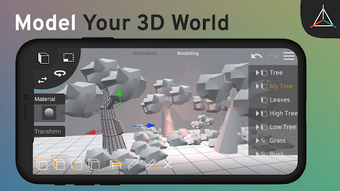
The user interface of Prisma3D Legacy is structured around a familiar layout, designed to mirror the experience of its predecessor. Navigation is streamlined, with toolbars and menus positioned for quick access to essential functions. The workflow emphasizes simplicity, allowing users to create and modify 3D models with minimal steps.
The interface is optimized for touch-based interaction, making it intuitive for mobile users. While detailed information about performance metrics such as CPU or RAM usage was not provided, the application’s lightweight nature suggests efficient resource management. The developer did not specify resource usage details, so actual performance may vary based on device capabilities.
Stability is a key focus, with the software designed to operate reliably over extended sessions. Users can expect consistent behavior when working on complex models, though exact load times or rendering speeds were not disclosed. General software behavior patterns suggest that the application maintains responsiveness under typical usage conditions.
For users accustomed to the older version, the interface offers a sense of continuity, reducing the need for relearning. The overall experience is geared toward minimizing friction and maximizing productivity in creative tasks.
Compatibility & System Requirements
Prisma3D Legacy is available for Android devices, ensuring accessibility across a wide range of mobile hardware. The software version is specified as v2.1, indicating a stable release with known functionality. The installation size is not explicitly listed, but the application is described as lightweight, suggesting minimal storage requirements.
The developer did not provide additional system requirements, leaving exact hardware specifications undefined. Compatibility information is limited to the Android platform, with no mention of other operating systems such as Windows or Mac. Users should verify device compatibility through official channels or testing.
The absence of detailed system requirements means that performance on specific devices may vary. While the application is designed to run efficiently on older devices, actual results depend on individual hardware configurations. For users seeking to install the software, it is recommended to confirm device compatibility before proceeding.
The lack of detailed technical data requires caution when assessing suitability for high-end or low-end systems.
Pros and Cons
Pros
- Free to download and use, making it accessible for hobbyists and budget-conscious users.
- Stable legacy version that maintains familiar tools and interface for returning users.
- Lightweight design suitable for older or low-spec Android devices.
- Supports multiple file formats for seamless project import and export.
- Operates offline, ensuring uninterrupted workflow without internet dependency.
Cons
- No official support for desktop operating systems like Windows or Mac.
- Limited information on system requirements and performance characteristics.
- Not updated with new features or modern enhancements found in current 3D tools.
- Exclusive availability on Android may restrict broader user adoption.
- Lack of detailed documentation or user guides for new users.
FAQ Section
Is Prisma3D Legacy available for Windows or Mac?
Prisma3D Legacy is currently only available for Android devices. There is no official version for Windows or Mac operating systems.
Is the software secure to download?
As a free application available on Android, it is recommended to download Prisma3D Legacy from official sources to ensure security and authenticity.
Does Prisma3D Legacy require an internet connection?
No, the application operates entirely offline, allowing users to work on 3D models without needing an internet connection.
How often is Prisma3D Legacy updated?
The update frequency is not specified. The current version is v2.1, and no information about future releases was provided.
Can I use Prisma3D Legacy for professional projects?
While the software is suitable for hobbyists and personal creative work, its legacy status and limited feature set may not meet the demands of professional-grade 3D modeling projects.
Final Thoughts + CTA
Prisma3D Legacy stands out as a reliable option for users who depend on a stable, familiar 3D modeling environment without the complications of modern updates. Its lightweight design, offline functionality, and support for multiple file formats make it a practical tool for hobbyists and creatives managing older projects. While it lacks modern features and desktop compatibility, its strengths lie in consistency and ease of use.
For those who value continuity and simplicity, this legacy version offers a dependable solution. The free access model further enhances its appeal. If you're working on a personal 3D project or need to finalize designs from previous years, Prisma3D Legacy delivers a focused, no-frills experience.
Download Prisma3D Legacy now and continue your creative journey with confidence.





.png)

